Getting an equation from a paper or a slide deck into a Word document usually means one of three things: rebuilding it symbol by symbol in Word’s equation editor; pasting a screenshot that looks right but can’t be edited, so one wrong superscript means taking it again; or finding the LaTeX source and walking it through Word’s own LaTeX input.
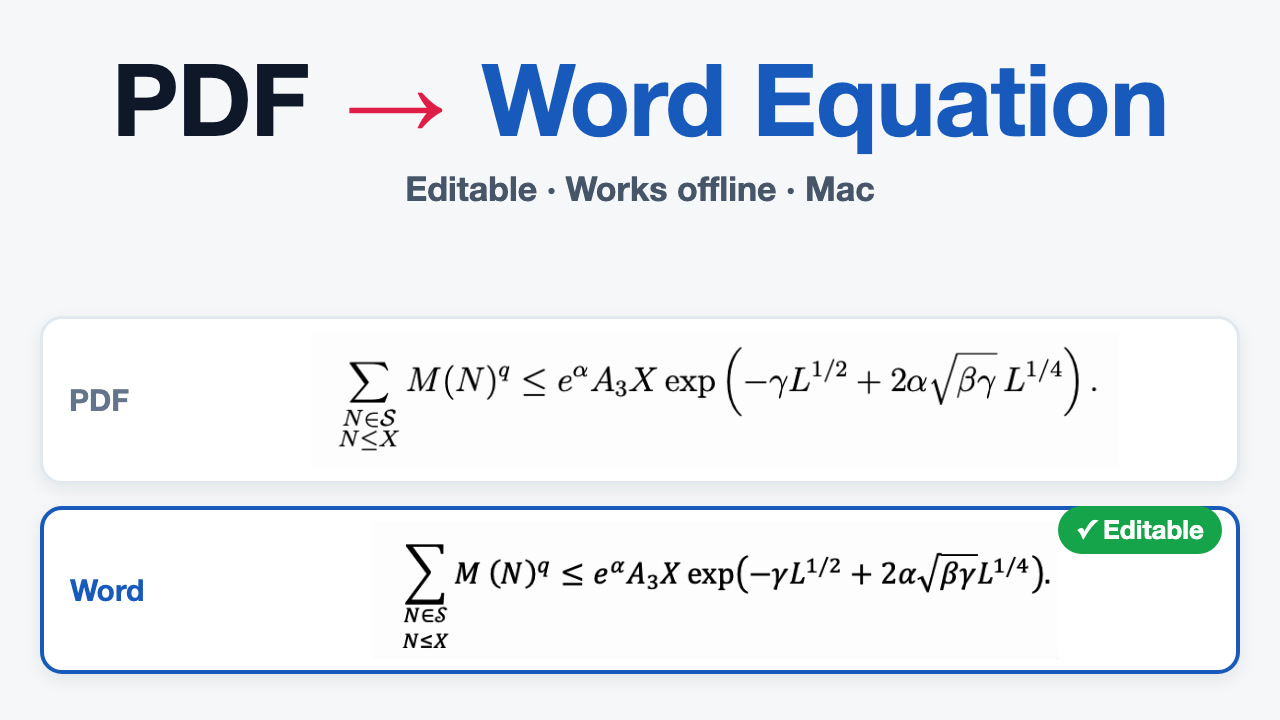
Since ClariRec 2.4.2 it’s one short path: screenshot → Recognize formula → Copy as Word Equation → ⌘V in Word. What lands in Word is a native Word equation — click into it and edit it like one you typed yourself.

What you need
| ClariRec 2.4.2 or later | Free on the Mac App Store |
| Microsoft Word for Mac | Tested with Word for Mac 16.109.2, pasting into the document body |
| A formula engine (either one) | On-device GLM-OCR: Apple silicon + 16 GB memory, a one-time ~1.34 GB download, 20 free recognitions a month; or a BYOK cloud provider (Custom API / Qwen, Pro) |
Setting up the on-device engine: Local formula OCR.
Try it before downloading anything: Settings → Providers → Formula → Formula examples opens five built-in formulas. Copy as Word Equation works there too — no network, no allowance used.
Five steps into Word
- Press
⌥Sand select tightly around the formula, leaving surrounding paragraph text out. - The result window shows plain text recognition first — for a formula that’s usually gibberish, which is expected. Click Recognize formula (the ƒ(x) icon) in the bottom bar and the window switches to the typeset formula.
- Check the preview. If a symbol is wrong, click Show formula editor (pencil icon) and correct the LaTeX source. The preview follows as you type, and ⌘Z undoes one step at a time.
- Open Copy or export formula (document icon) and choose Copy as Word Equation.
- Switch to Word, put the cursor in the document body, and press ⌘V.
Click into the pasted equation and change a numerator or one cell of a matrix: it stays an equation, not an image or a line of text.
Copying takes the source as it is in the editor when you click. Fix something, copy again — no need to recognize again.
Which structures survive
Each of these was pasted into Word for Mac one by one and arrived as a Word equation object with the right structure:
| Structure | LaTeX example |
|---|---|
| Fractions, sub- and superscripts | \frac{a}{b}+x^2 |
| Roots | \sqrt{x}+\frac{1}{2} |
| Sums with limits | \sum_{i=1}^{n} i^2 |
| Integrals with limits | \int_{-\infty}^{\infty} e^{-x^2}\,dx = \sqrt{\pi} |
| Matrices | \begin{pmatrix} 1 & 2 \\ 3 & 4 \end{pmatrix} |
| Piecewise functions | \begin{cases} x^2 & x \ge 0 \\ -x & x < 0 \end{cases} |
| Aligned lines | \begin{aligned} a &= b + c \\ d &= e - f \end{aligned} |
| Vectors and dot accents | \vec{F}=m\,\ddot{x} |
| Greek letters, relations, operators | \alpha + \beta \le \Gamma \cdot \nabla \times \infty |
| Stretchy brackets | \left( \frac{1}{1+e^{-x}} \right) |
| Text inside a formula | P(A \mid B) \text{ for } P(B) > 0 |
The Word equation is generated by ClariRec’s bundled KaTeX, so only source the preview can render can be copied as a Word equation. If the preview reports a command as unsupported, the Word equation can’t be generated either — see troubleshooting below.
Compared with the alternatives
| Method | Editable in Word? | What it takes |
|---|---|---|
| Typing it in Word’s equation editor | Yes | Entering every symbol and structure by hand |
| Inserting a screenshot | No | Doesn’t match the body text; one wrong symbol means a new screenshot |
| Word’s own LaTeX input | Yes | You need the LaTeX first, then insert an equation, switch to LaTeX, paste, convert |
| ClariRec Copy as Word Equation | Yes | Screenshot, recognize, copy, ⌘V |
When you already have the LaTeX
If the source comes from Overleaf or elsewhere, Word’s own LaTeX input works too (tested on Word for Mac 16.109.2):
- Insert an equation in Word: Insert → Equation, or Control + =.
- The equation box reads input as UnicodeMath by default, so pasted LaTeX isn’t converted. Switch the format to LaTeX in the equation tools first.
- Paste the source, then click Convert.
In ClariRec, Copy raw LaTeX gives you exactly that source.
Pages and Keynote don’t take the Word equation. Use their own equation box instead: choose Copy raw LaTeX in ClariRec, then in Pages or Keynote choose Insert → Equation, paste into the box and click Insert.
If the paste doesn’t look right
It pasted as text, not an equation Make sure you chose Copy as Word Equation, not Copy raw LaTeX, and paste with the cursor in the body of a Word for Mac document. The clipboard also carries the raw LaTeX as plain text, so apps that don’t understand equations get the source.
“Couldn’t Copy Word Equation” appears The source has a syntax error or uses a command KaTeX can’t render. Your clipboard is left as it was. Open the formula editor, read the status line under the preview, rewrite the command in a supported form and copy again.
Copy as Word Equation is greyed out
Open the menu to read the reason. Usually the source holds several separate formulas (for example $a$ and $b$); arrange it as one formula and the option comes back. Copy raw LaTeX always works.
An inline formula pasted into an empty paragraph shows up centered That is how Word places it; the equation itself is fine.
Can I still copy after this month’s recognitions run out? Yes. Only successful recognitions count. Editing, previewing, Copy as Word Equation and exporting never run the recognizer, so formulas you already have stay editable and copyable.
Word for Windows or Word on the web Not covered. Copy as Word Equation has only been tested with Word for Mac.
Privacy
- With the on-device engine, the screenshot never leaves your Mac. With a BYOK cloud provider, only the screenshot you recognize goes straight to the endpoint you configured, never through ClariRec servers.
- The Word equation is generated on your Mac, with no network request and no file written. Formula results live in memory only and are cleared when you close the result window.
Related
Screenshot to LaTeX guide · Local formula OCR · API keys · FAQ