To translate screenshot text on Mac with ClariRec: press ⌥S (or ⌥V for a clipboard image), wait for OCR, then translate in the result window. Recognition stays local by default; translation uses a local model, Apple Intelligence, system translation, or a BYOK provider — only when you ask.
You can also skip OCR and translate selected text (Services) or clipboard text (⌥T).
When this workflow helps
- Foreign UI strings trapped in screenshots
- Multilingual slides, papers, and scanned pages
- Chat or product screenshots you need to understand quickly
- Selected text in another app (via macOS Services)
- Text already on the clipboard (via
⌥T)
End-to-end: screenshot → translate
- Press
⌥Sand select the region (or use⌥Vfor a clipboard image). - Wait for OCR. Default System OCR stays on your Mac.
- In the result window, trigger translation (or rely on Auto Translate if you enabled it).
- Switch the target language in the result window if needed — ClariRec retranslates the current text immediately.
- If OCR misread a word, edit the source text in place and press
⌘⏎to retranslate without capturing again.
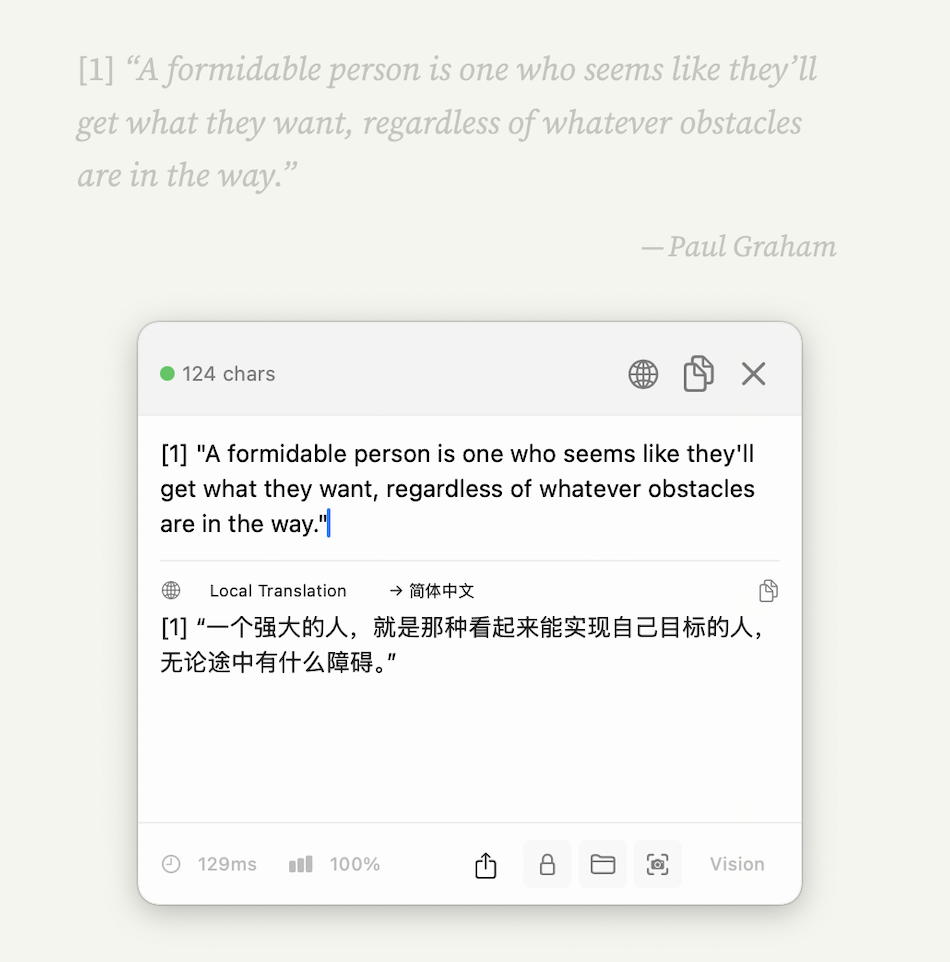
Same workflow after translation: Vision OCR plus Local Translation to Simplified Chinese in one Popup. After the model download, this path keeps both recognition and translation on your Mac — see the local translation model guide.
OCR engine and translation engine are independent. You can keep System OCR while using a local model, Apple Intelligence, system translation, or a BYOK cloud provider for translation.
Choose a translation engine
Pick the engine that matches your privacy and quality needs:
| Engine | Needs API key? | Network for content? | Notes |
|---|---|---|---|
| Local model (HY-MT2) | No | No after one-time ~1.1GB model download | Fully offline translation; download supports pause/resume |
| Apple Intelligence | No | No for translation content | macOS 26+; availability depends on device, region, language, and system Apple Intelligence state |
| macOS system translation | No | Sometimes (language pack download) | macOS 15+; free, no setup in ClariRec |
| BYOK cloud | Yes | Yes — text goes to your configured endpoint | DeepL, Mercury-2, OpenAI, Anthropic, DeepSeek, GLM, Grok, OpenRouter, SiliconFlow, Custom API, Qwen, Mistral |
Practical defaults
- Want offline after setup → local model
- On a supported macOS 26 Mac with Apple Intelligence ready → try Apple Intelligence first
- Want zero configuration on macOS 15+ → system translation
- Want a specific cloud quality or language pair → BYOK
Provider setup steps: API key guide.
Low-intrusion translation (no screenshot)
Not every translation starts with an image.
macOS Services
In another app, select text → right-click → Services → Translate with ClariRec. ClariRec shows a compact Mini translation HUD near the pointer and does not take focus from the current app. You can assign a system-wide shortcut to this service in System Settings.
Clipboard hotkey (⌥T)
Copy text, press ⌥T, and translate whatever is currently on the clipboard in the same Mini HUD. Remap the shortcut in Settings → Shortcuts if needed.
These paths use your currently selected translation engine and follow the same local-first / BYOK rules as the result window.
Editable Source Text & Technical Text Protection
The recognized text pane remains completely editable at all times:
- Fix OCR typos: If a low-contrast character is misread, edit it directly in the upper source text pane without recapturing.
- Instant retranslation: Press
⌘⏎(Command + Return) to retranslate the edited text immediately (Enterremains dedicated to newlines). - Manual text input: When no text is detected in an image, you can paste or type directly into the empty box to translate.

Technical Text Protection (Enabled by Default): When invoking large language model (LLM) translation providers, ClariRec automatically masks URLs, code blocks, CLI arguments, and programming identifiers to prevent AI models from altering terms like import torch, deepseek-coder, or repository paths.
Supported Target Languages
Simplified Chinese, Traditional Chinese, English, Japanese, Korean, French, German, Spanish, Russian, Portuguese, and Arabic (11 targets). Switch the target in the result window to retranslate immediately.
Custom API vs built-in translation providers
For OpenAI, Anthropic, DeepSeek, GLM, Grok, OpenRouter, and SiliconFlow, prefer the built-in translation providers — usually only an API key is required.
Use Custom API when you need a compatible Chat Completions endpoint that is not listed as a dedicated provider (proxy, self-hosted, Gemini’s OpenAI-compatible URL, Ollama, and similar). Translation only needs a text-capable model. Image capability is required only if you also use that endpoint for OCR or formula recognition.
Privacy boundary
| Step | Where content goes |
|---|---|
| Default OCR | Stays on your Mac |
| Local model / Apple Intelligence translation | Stays on-device |
| System translation | Handled by Apple system services; may download a language pack |
| BYOK translation | Only the text you trigger is sent directly to your configured endpoint |
ClariRec does not operate a server that receives your OCR images or translation text. Details: Local OCR for macOS.
Troubleshooting
Translation stays loading (system translation)
The language pack may be missing. Follow the in-app prompt to download it; ClariRec retranslates when the pack is ready.
BYOK returns key / quota / server errors
Check the localized error category and HTTP status in the result. Confirm the key, quota, and region in the provider console. See the API key guide.
Identifiers or URLs got translated
Keep technical text protection on for LLM engines, or switch to DeepL / system translation for that snippet.
You only needed OCR
Leave translation off. Recognition does not require a translation engine.
Related
Screenshot OCR · Selected text · Shortcuts / URL scheme · Local translation model · API keys · Local OCR · FAQ